Ads Radar
Ads Radar shows which brands pay to appear in the answers on one of your topics, which creatives they run, and where you stand against them.
Ads Radar shows which brands pay to appear in the answers on one of your topics, which creatives they run, and where you stand against them. It is an observation tool: it reports the sponsored blocks GetMint captured while your prompts ran. It does not buy anything — that is Ads Studio.
Where the numbers come from
Ads are captured as a side effect of visibility tracking. Every time GetMint runs one of your prompts, it records the answer — and if that answer carried a sponsored block, it records the ads in it too. No separate crawl, no extra credits.
Two consequences are worth stating plainly, because both surprise people:
- You appear in Ads Radar only when your own ads are observed in an answer. The page does not read your Ads Studio account. If you launched a campaign an hour ago, Radar will show it once the ads actually turn up in a captured answer.
- Coverage follows your prompts. A topic with three tracked prompts is a topic Radar can only see three prompts' worth of. The more prompts you watch, the sooner the picture is trustworthy.
Why only ChatGPT
The model filter on this page is locked, and that is deliberate rather than a limitation being worked around.
The ChatGPT interface is currently the only tracked surface that serves sponsored cards. Every other model returns an answer that structurally cannot carry one. If those answers were counted in the denominator, the ad rate would not be diluted — it would be replaced by the reciprocal of how many models you track. A prompt observed on five models with an ad on the one surface that serves them would read 20%, and so would every other prompt that drew a single ad. The number would stop describing advertising and start describing your model selection.
The four headline metrics
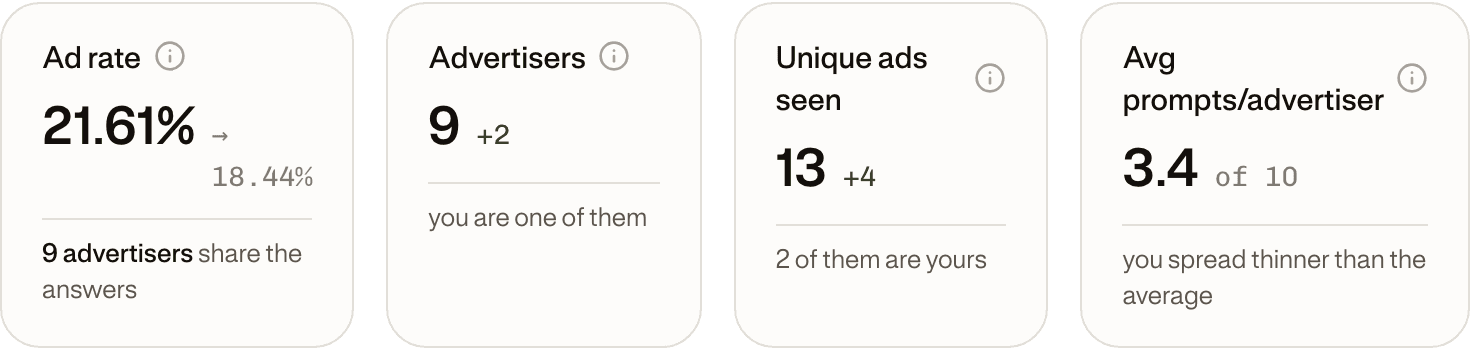
| Metric | What it counts |
|---|---|
| Ad rate | Share of answers on this topic that contain at least one ad, from any advertiser. The same metric as the Ad Rate column in the Prompt wallet, one grain up. |
| Advertisers | Distinct brands observed advertising here. Retailers are included in the count but excluded from the verdict, where only tracked competitors matter. |
| Unique ads seen | Distinct creatives observed. The same ad returned many times counts once. |
| Avg prompts/advertiser | How many of your prompts each advertiser buys on average. High means broad campaigns, low means surgical bidding. |
Each tile carries its comparison against the previous period of equal length. Ad rate shows the previous value rather than a delta — "21.61% coming from 18.44%" reads better than "+3.17" — while the counts show signed deltas, because "two more advertisers arrived" is the thing that happened.
Who is advertising
The ranking card answers the question the page exists for: who is buying attention on this topic, and how much of it.
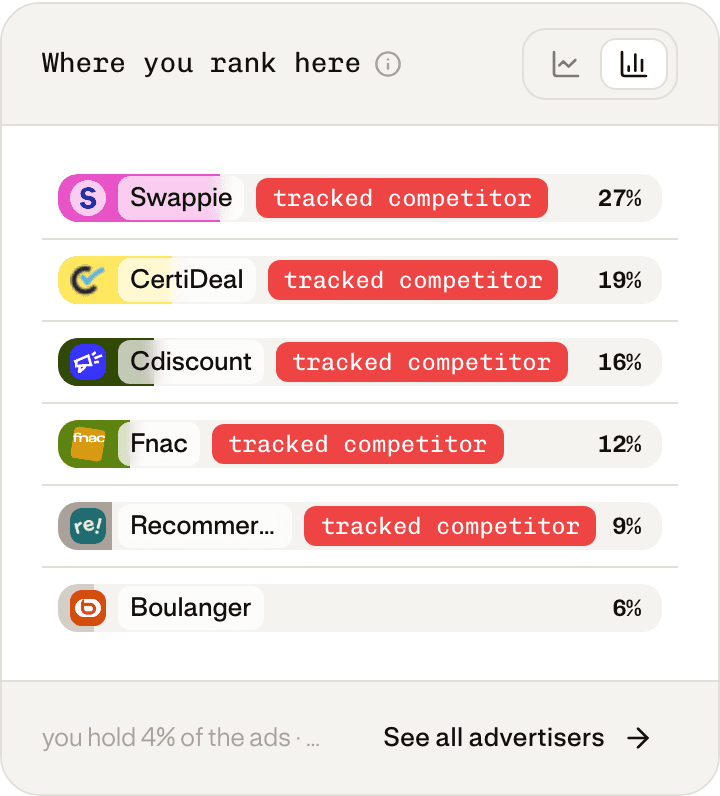
Every advertiser falls into one of three buckets, and only two of them get a badge:
- you — your own brand.
- tracked competitor — a brand on your competitor list.
- no badge — everyone else.
That third bucket is unlabelled on purpose. It holds retailers, marketplaces, adjacent categories and brands you have simply never declared. Calling them "competitors" would assert something the data does not support; calling them "other" would suggest they matter less, when a marketplace outbidding you on your own category is very much your problem. So they are counted, ranked and left for you to judge.
The card toggles between Ranking and Over time, and the title changes with your own position: it reads "Who is advertising" while you are absent from the topic, and "Where you rank here" once your ads have been seen.
The ads themselves
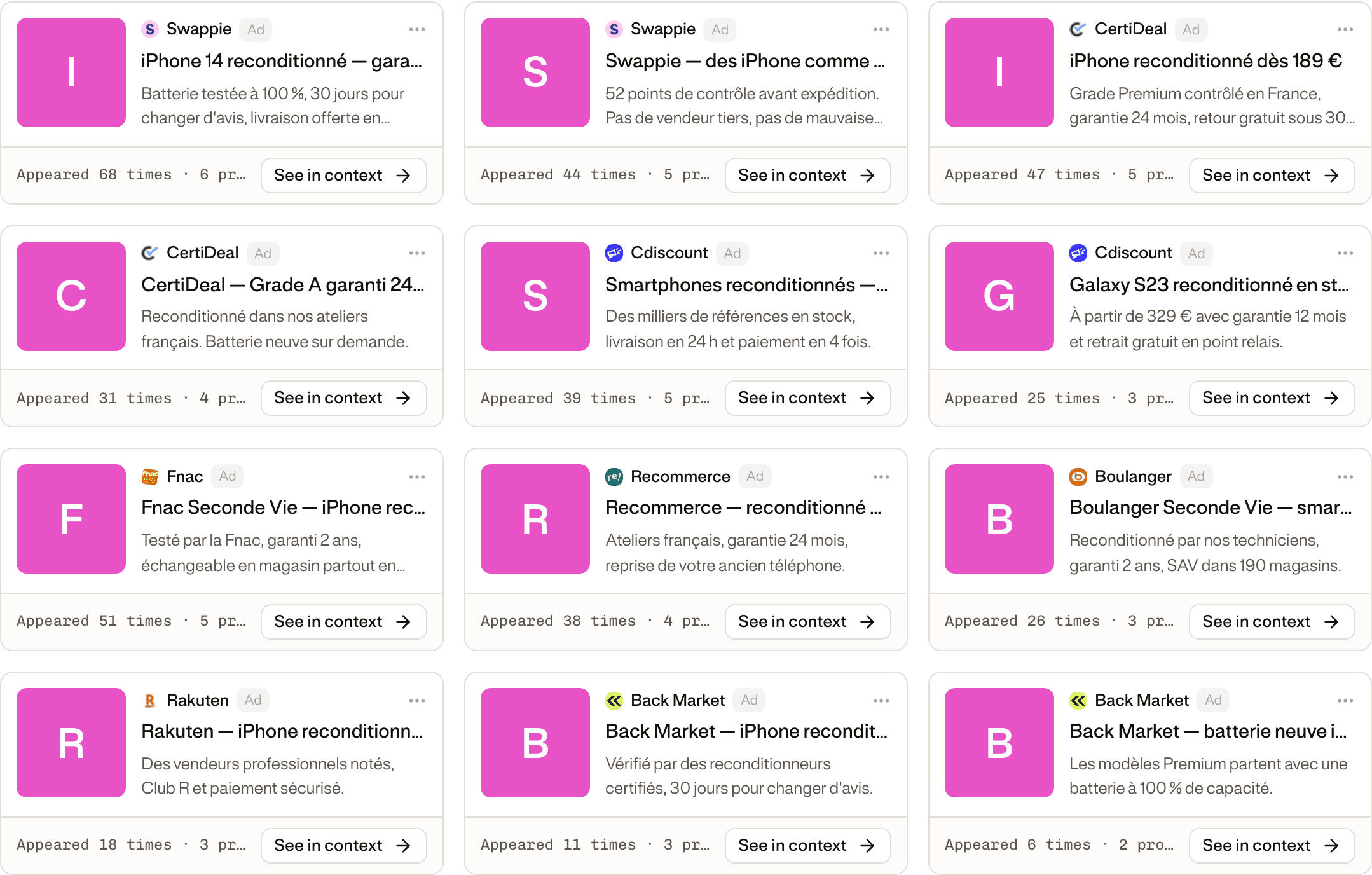
A creative is one distinct ad, and it carries three different counts that are easy to confuse:
| Count | Meaning |
|---|---|
| Appeared N times | How many ad cards were observed for this creative. |
| N prompts | How many different prompts triggered it. |
| First and last seen | How long it has been in rotation. |
A creative running for weeks across many prompts is a committed campaign. One that appeared twice last Tuesday is a test. The difference tells you whether a competitor is probing your category or has settled into it.
Replaying the answer
Any creative opens into the answer it appeared in — the reply exactly as observed, with the sponsored block marked.
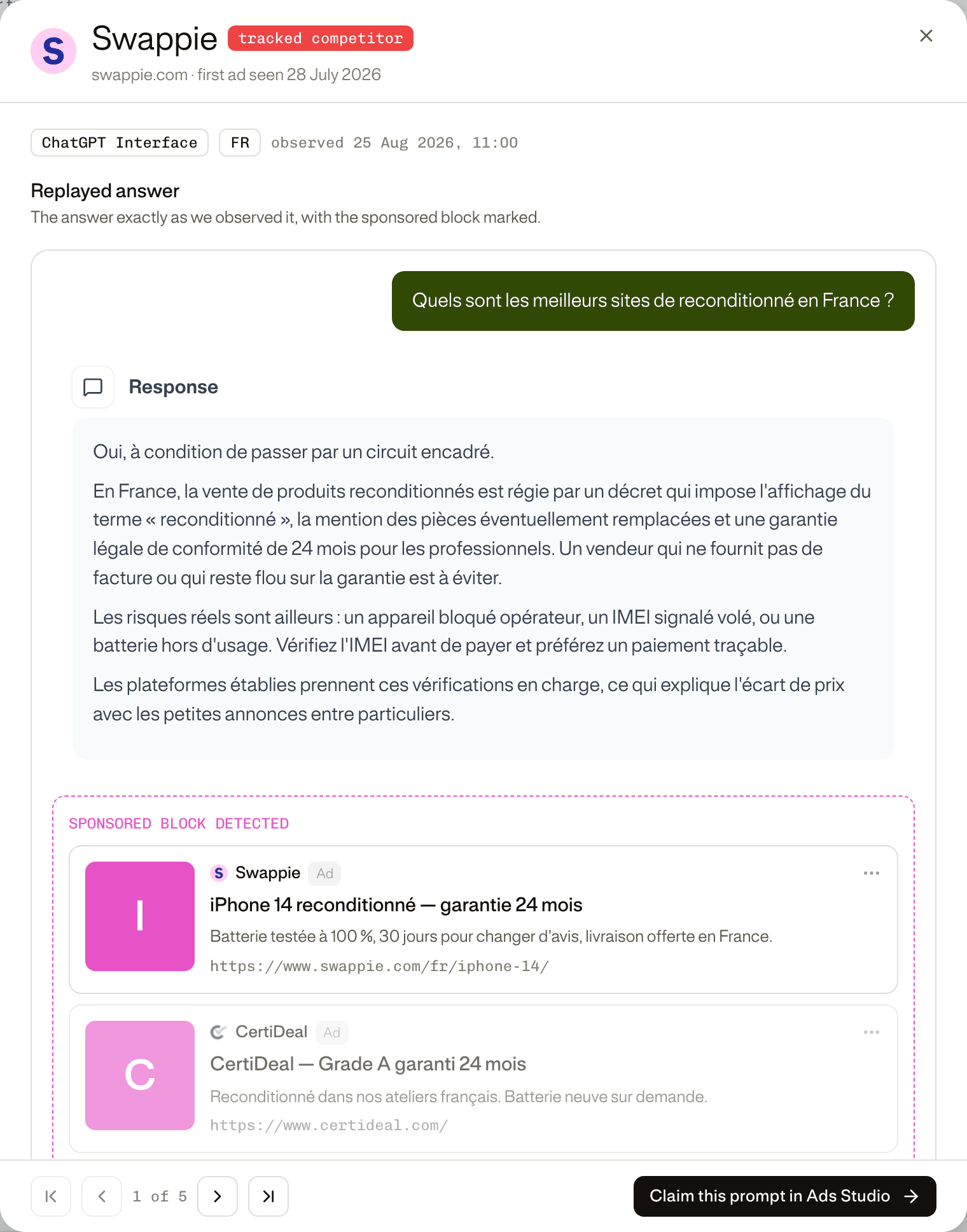
This is the view that makes an ad rate concrete. You see the question a real person could ask, the answer the assistant gave, and the ads it carried — in position, in context, with the model and market it was observed on. The footer steps through every observation of that creative, so you can watch a competitor's placement move over time.
Ad rate per prompt
Topic-level numbers hide the shape of a market. A topic at 20% might be ten prompts at 20%, or two prompts at 90% and eight at nothing — and those are completely different situations.
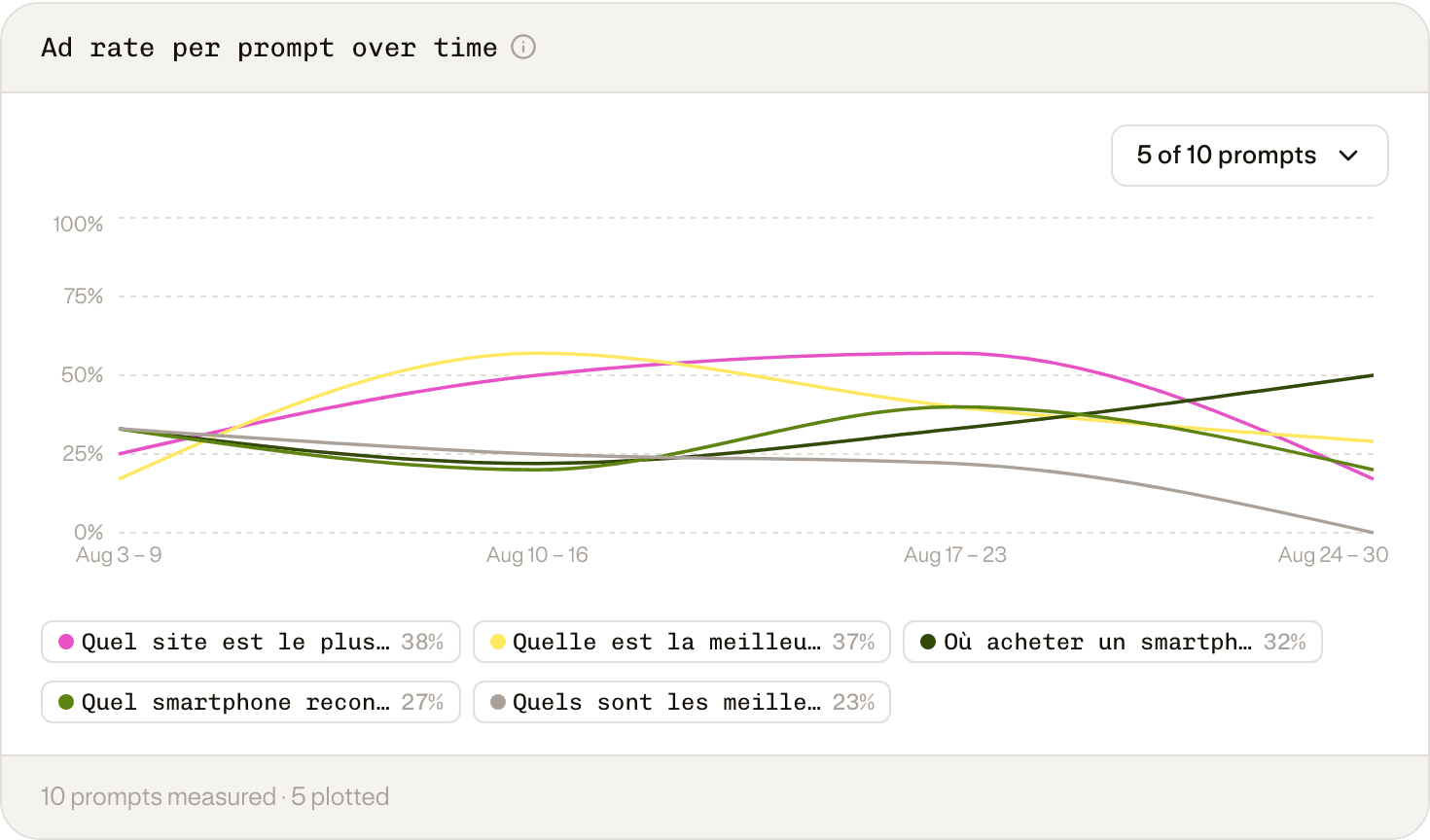
Prompts are individually included in or excluded from Ads Radar from the row menu in the Prompt wallet (Assign to Ads / Remove from Ads). An excluded prompt disappears from every figure on this page, including the denominator.
Where a prompt stands
Radar classifies each prompt by crossing two measurements: how often ads run on it, and how often the answers name you. That gives five situations.
| Situation | Ads on the prompt | You are named in | What it means |
|---|---|---|---|
| Contested stronghold | 30% or more | 30% or more | Somebody is paying to interrupt an answer you already win. Holding the slot costs less than winning it back. |
| Quiet stronghold | under 30% | 30% or more | You win it and almost nobody is bidding. Cheap inventory to hold before someone notices it. |
| Rival-owned | — | under 30% | A competitor you track runs more ads here than anyone else. Winning it means taking it off them: the most expensive move there is. |
| Open monetised | 5% or more | under 30% | Money is already moving and no brand owns the answer. The slot is buyable without displacing anyone. |
| Unclaimed | under 5% | under 30% | Nothing to outbid and nobody to displace. The cheapest and earliest position there is. |
The two ad thresholds ask different questions on purpose. For a prompt you already win, how hard someone is interrupting is a matter of degree, so the bar is high. For a prompt nobody owns, the question is only whether money is moving at all — so the bar is low, because a density floor would file every early market in the same bucket as prompts no advertiser has ever touched.
When the page says nothing yet
If Radar has not seen enough to draw a conclusion, it says so rather than showing you an empty chart. Two honest reasons:
- Not enough observations. Few prompts tracked, or too short a window. The banner tells you how many prompts are watched and how many runs have been collected.
- No ad inventory in your market. Advertisers do not buy everywhere. Zero ads is the common case, not a fault — most domains that run on the ChatGPT interface never observe a single ad. That is a finding about your category, not a broken page.
Key takeaways
- 01Ads Radar reports sponsored blocks captured while your visibility prompts ran — no extra crawl, no extra credits.
- 02Every figure is measured over ChatGPT answers only, because it is the only tracked surface that serves ads. Including the others would replace the ad rate, not dilute it.
- 03You appear on this page only once your own ads are observed in an answer. It never reads your Ads Studio account.
- 04Advertisers are badged as you or tracked competitor; everyone else is counted and left unlabelled, because the data does not support a stronger claim.
- 05A creative's appearance count, prompt count and first-seen date separate a committed campaign from a test.
- 06Each prompt is classified by crossing ad density with your own visibility, which is what turns the page into a list of moves.
- 07Zero ads is a normal result. It usually means your category has no buyers yet, not that something is wrong.