Ads Studio
Ads Studio is where you buy the positions Ads Radar found — campaigns, ad groups and ads on the ChatGPT ad platform, started from a prompt rather than a keyword.
Ads Studio is where you buy the positions Ads Radar found — campaigns, ad groups and ads on the ChatGPT ad platform, started from a prompt rather than a keyword. It is a separate workspace with its own address, reachable from the app switcher in either sidebar.
Before you can use it
Access is not a plan setting. Three things have to be true, and the app tells you which one is missing:
- An ad account exists for the brand. If not, you land on the connect flow: payment method, then business registration country, billing currency (US dollars or euros) and reporting timezone, then brand assets. The country, currency and timezone cannot be changed afterwards.
- The account is not in review. New accounts are reviewed before they can spend.
- A payment method is on file. Budgets settle against the card on your billing profile.
Separately, your role in the organization decides what you can do. Viewers can read every screen; creating and editing campaigns requires edit rights.
Starting from the radar
You can build a campaign from scratch, but the point of having Radar upstream is that you rarely need to. Radar ends every topic with a list of positions, sorted by what kind of move each one is.
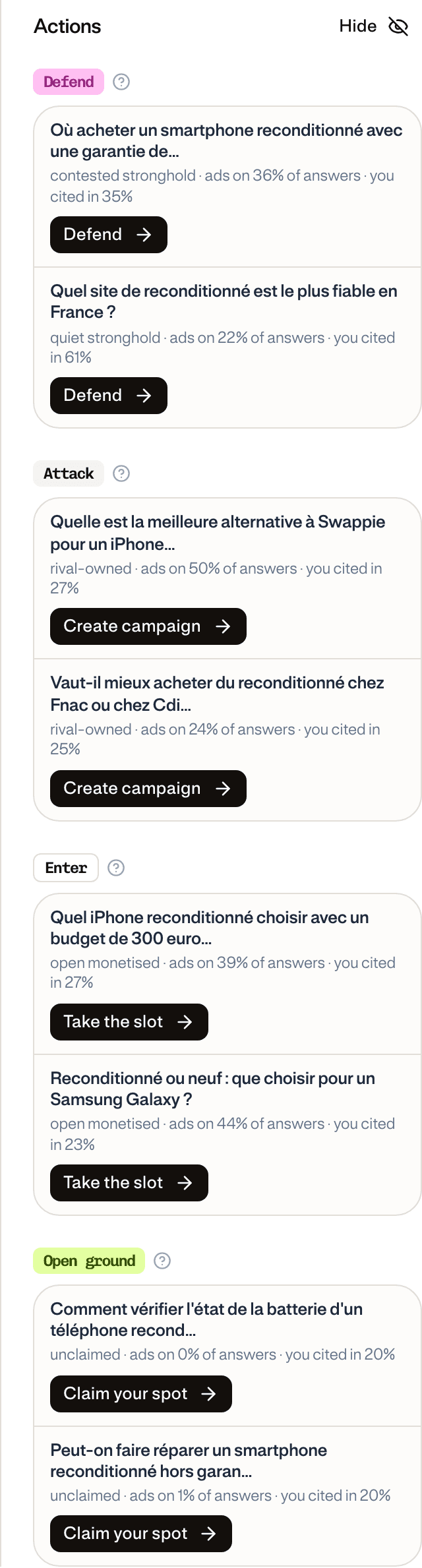
The four groups are not four labels for the same button. They are four genuinely different purchases:
| Group | The prompts in it | Why you would buy |
|---|---|---|
| Defend | Answers that already name you | Cheaper to hold than to win back |
| Attack | A tracked competitor leads the ads and you are barely named | The most expensive move, and the only one that costs a rival their position |
| Enter | Money is moving but nobody owns the answer | Demand is already proven and there is no incumbent to displace |
| Open ground | Almost no ads, and you are barely named | The earliest and cheapest position — and the one a competitor takes if you do not |
Enter sits beside Attack rather than inside it on purpose: a prompt with a proven bid and no incumbent is a different proposition from one you have to take off a named competitor.
The other way in is from a captured ad. Any replayed answer in Radar offers to build the campaign for the prompt that produced it.
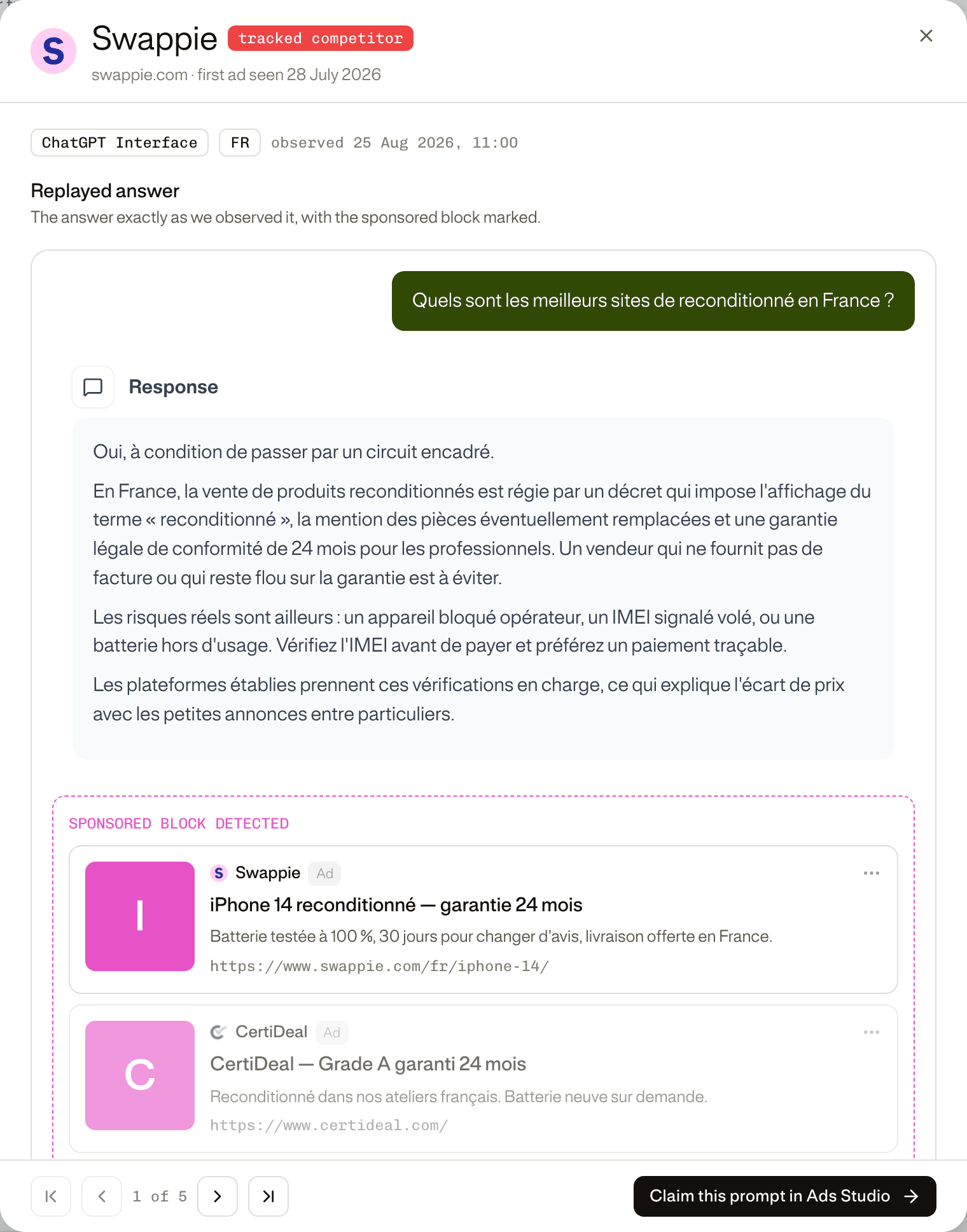
Either route carries the prompt and its position across, so the campaign opens already knowing what it is for.
The wizard
Picking a position opens the campaign builder, which drafts the campaign before showing it to you: named, targeted, and written from your brand's own context and the ads already observed on that prompt. Everything is editable — it is a first draft, not a commitment.
Three steps, with a rail on the left tracking them:
- Create Campaign — objective, schedule, targeting, locations, audience and conversion event. Locations are derived from the topic's market.
- Create Ad Group & Ads — bid strategy and delivery on the group; headline, description, image and destination on each ad. Ad groups and ads can be added, duplicated or removed here, and anything incomplete is marked in the rail.
- Review — the whole campaign in one screen before it publishes.
Publishing pushes the campaign to the ad platform. If the campaign is created but some ad groups or ads fail, it is reported as a partial publish rather than a silent success.
Tracking the clicks you buy
Every ad has one destination URL, set on the ad. What the platform actually opens on a click is that URL plus a query-parameter template — the tracking suffix your analytics reads (utm_source=chatgpt&utm_campaign={campaign_id}&click_id={oppref}). The field is called Landing page query parameters and it is optional.
The template can be set at three levels — campaign, ad group and ad — because the platform merges them rather than picking one. Every parameter from every level lands on the URL; when the same key is set twice, the most specific level wins:
| Level | Applies to | Beaten by |
|---|---|---|
| Campaign | every ad in the campaign | ad group, ad |
| Ad group | every ad in the group | ad |
| Ad | this ad only | nothing |
A parameter already written into the ad's destination URL is never overwritten by any level.
So the working pattern is: put the parameters every ad shares on the campaign — source, medium, campaign id — and only reach for the lower levels to add or override something narrower, a utm_term per ad group or a utm_content per creative.
Five placeholders are replaced with the live value when the URL is built:
| Placeholder | Becomes |
|---|---|
{ad_account_id} | the ad account |
{campaign_id} | the campaign |
{ad_group_id} | the ad group |
{ad_id} | the ad |
{oppref} | the click identifier the platform assigns to each visit — the value to pass back to a conversion so it is attributed |
Running the account
Campaigns is one table with three tabs — Campaigns, Ad groups and Ads — sharing a date range and a column picker. Clicking a campaign drills into its ad groups; clicking an ad group drills into its ads.
The metric columns are the same at all three levels: Impressions, Clicks, Conversions, Spend, CTR, CPC, CPM. Each level adds what only it has — budget and dates on campaigns, bid strategy and billing event on ad groups, review status and destination URL on ads.
Rows can be paused, resumed, edited, duplicated and archived individually. Selecting several enables bulk edits: budget, dates, locations, bid, status and creative fields across everything selected at once.
Overview carries a performance trend with a strip of headline figures — Spend, Impressions, Clicks, CPC and Conversions — over 7, 14 or 30 days, or a range you choose.
Tools holds the two things campaigns depend on:
- Conversions — the data sources and pixel that report results back, and the conversion events you optimize toward.
- Audiences — reusable audience definitions, including uploaded lists.
Key takeaways
- 01Ads Studio is a separate workspace for buying the positions Ads Radar found. An “ad” here is an object you own, not an observation.
- 02Access depends on an ad account, a completed review and a payment method — not on your GetMint plan. Editing also requires edit rights.
- 03The intended path in is a hand-off from Radar, which carries the prompt and its position across.
- 04Defend, Attack, Enter and Open ground are four different purchases, not four names for one button.
- 05The wizard drafts a campaign from your brand context and the ads already seen on that prompt, then hands it to you to edit.
- 06Campaigns, ad groups and ads share one table and one metric set, with bulk edits across a selection.
- 07Landing page query parameters are a tracking suffix merged from the campaign, ad group and ad — the most specific level wins a duplicate key, and the destination URL beats them all.